
| 일 | 월 | 화 | 수 | 목 | 금 | 토 |
|---|---|---|---|---|---|---|
| 1 | 2 | 3 | 4 | |||
| 5 | 6 | 7 | 8 | 9 | 10 | 11 |
| 12 | 13 | 14 | 15 | 16 | 17 | 18 |
| 19 | 20 | 21 | 22 | 23 | 24 | 25 |
| 26 | 27 | 28 | 29 | 30 |
- 해외봉사
- Java
- 쿠키로그인
- 회고
- fastapi
- 프로젝트
- mysql
- OOM
- Dockerfile
- spring boot
- 세션로그인
- 로그인
- 서버 꺼짐
- springboot
- 알고리즘
- Lv.2
- 코딩테스트
- Spring
- 커밋 메시지
- 게시판
- cors
- crud
- openAI
- llm
- LV2
- docker
- 우테코
- 네팔
- 프로그래머스
- 부트스트랩
- Today
- Total
s00jin 님의 블로그
[EC2/MySQL] EC2 서버가 몇 시간 만에 꺼지는 이유와 해결 - OOM 문제 본문
올해 초에 했던 프로젝트에서 ec2 서버에 자바 애플리케이션과 mysql을 같이 실행하는 구조로 배포를 한 적이 있다.
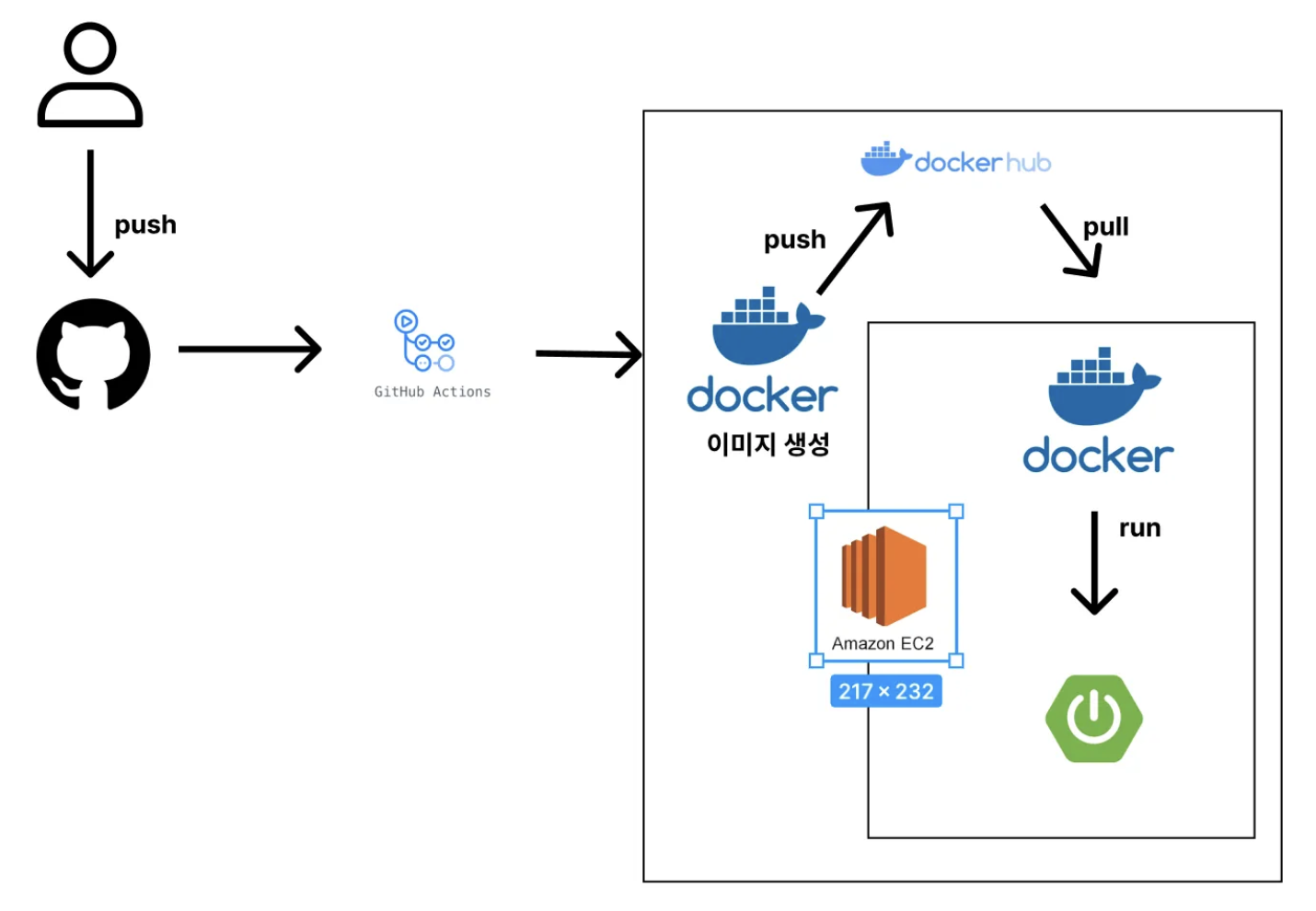
위 사진같은 구조로 배포를 했다.
이 서버를 실행 시키면 몇시간 뒤 서버가 꺼져있던 문제가 계속 발생했다.
그래서 이 서버 문제를 해결하려 하였지만….
그 작업을 할때 노트북이 고장났고….그래서 ec2 서버에 접속하던 pem키가 사라졌다….
그래서 정확한 문제의 원인은 알지 못하고 추정만 하는 상태였다.
그러다 이번 해커톤에서 똑같은 구조로 배포를 하였는데 정확히 똑같은 문제 상황이 발생했다!
문제 상황 분석
- 잘 돌아가던 서버가 몇 시간뒤 확인하면 접속 불가
- 연결 테스트 1/2 통과
도커 실행 상태 확인
ubuntu@ip-172-31-39-154:~$ docker ps
CONTAINER ID   IMAGE     COMMAND   CREATED   STATUS    PORTS     NAMES
ubuntu@ip-172-31-39-154:~$ docker ps -a
CONTAINER ID   IMAGE                            COMMAND                CREATED       STATUS                        PORTS     NAMES
c47235b41000   soojin6943/roommate-app:latest   "java -jar /app.jar"   7 hours ago   Exited (255) 49 minutes ago             roommate-container
docker ps 명령어를 통해 확인해보니 실행중인 컨테이너가 없다.
그래서 docker ps -a로 모든 컨테이너를 확인해봤더니,
Exited(255) 상태로 컨테이너가 종료된걸 확인할 수 있었다.
디스크 확인
ubuntu@ip-172-31-39-154:~$ df -h
Filesystem      Size  Used Avail Use% Mounted on
/dev/root        29G  4.3G   24G  16% /
tmpfs           479M     0  479M   0% /dev/shm
tmpfs           192M  900K  191M   1% /run
tmpfs           5.0M     0  5.0M   0% /run/lock
/dev/xvda16     881M  111M  709M  14% /boot
/dev/xvda15     105M  6.2M   99M   6% /boot/efi
tmpfs            96M   12K   96M   1% /run/user/1000
→ 16%로 디스크 문제는 아닌것 같다
메모리 확인
ubuntu@ip-172-31-39-154:~$ free -m
               total        used        free      shared  buff/cache   available
Mem:             957         719         131           0         262         237
Swap:              0           0           0
- 총 메모리: 957 MB (t2.micro라 메모리 1GB)
- top -o %MEM 명령어로 메모리 사용량 확인
- Java 가 약 373MB 차지
- MySQL이 약 388MB 차지
- 여유 메모리 129MB 정도밖에 없음 → 금방 메모리 부족(OOM) 위험
- 스왑 공간 없음→ 메모리 부족 시 바로 프로세스가 kill 됨
추정
메모리 여유가 거의 없어, 몇 시간 서비스 돌리면 MySQL + Spring Boot가 메모리 더 먹고 → OOM 발생
OOM (Out Of Memory)
* 메모리가 부족하여 커널이 프로세스를 강제로 죽이는 것
* 보통 메모리를 많이 쓰는 프로세스(MySQL, Java)가 희생양이 된다고 함
스프링 로그 확인
ubuntu@ip-172-31-39-154:~$ docker logs roommate-container

  .   ____          _            __ _ _
 /\\\\ / ___'_ __ _ _(_)_ __  __ _ \\ \\ \\ \\
( ( )\\___ | '_ | '_| | '_ \\/ _` | \\ \\ \\ \\
 \\\\/  ___)| |_)| | | | | || (_| |  ) ) ) )
  '  |____| .__|_| |_|_| |_\\__, | / / / /
 =========|_|==============|___/=/_/_/_/

 :: Spring Boot ::                (v3.5.4)

// 생략

// 서버 실행 확인
2025-08-31T07:53:15.146Z  INFO 1 --- [roommate] [           main] o.s.b.w.embedded.tomcat.TomcatWebServer  : Tomcat initialized with port 8080 (http)
2025-08-31T07:53:15.186Z  INFO 1 --- [roommate] [           main] o.apache.catalina.core.StandardService   : Starting service [Tomcat]
2025-08-31T07:53:15.188Z  INFO 1 --- [roommate] [           main] o.apache.catalina.core.StandardEngine    : Starting Servlet engine: [Apache Tomcat/10.1.43]
2025-08-31T07:53:15.530Z  INFO 1 --- [roommate] [           main] o.a.c.c.C.[Tomcat].[localhost].[/]       : Initializing Spring embedded WebApplicationContext
2025-08-31T07:53:15.533Z  INFO 1 --- [roommate] [           main] w.s.c.ServletWebServerApplicationContext : Root WebApplicationContext: initialization completed in 5686 ms

// mysql 연결 확인
2025-08-31T07:53:16.913Z  INFO 1 --- [roommate] [           main] com.zaxxer.hikari.HikariDataSource       : HikariPool-1 - Starting...
2025-08-31T07:53:18.021Z  INFO 1 --- [roommate] [           main] com.zaxxer.hikari.pool.HikariPool        : HikariPool-1 - Added connection com.mysql.cj.jdbc.ConnectionImpl@6ea3a513
2025-08-31T07:53:18.029Z  INFO 1 --- [roommate] [           main] com.zaxxer.hikari.HikariDataSource       : HikariPool-1 - Start completed.
2025-08-31T07:53:18.598Z  INFO 1 --- [roommate] [           main] o.hibernate.jpa.internal.util.LogHelper  : HHH000204: Processing PersistenceUnitInfo [name: default]
2025-08-31T07:53:18.889Z  INFO 1 --- [roommate] [           main] org.hibernate.Version                    : HHH000412: Hibernate ORM core version 6.6.22.Final

// 생략
// 서버 실행 확인 가능

2025-08-31T07:53:30.644Z  INFO 1 --- [roommate] [           main] o.s.b.w.embedded.tomcat.TomcatWebServer  : Tomcat started on port 8080 (http) with context path '/'
2025-08-31T07:53:30.717Z  INFO 1 --- [roommate] [           main] c.roommate.roommate.RoommateApplication  : Started RoommateApplication in 22.455 seconds (process running for 24.437)
// 몇 시간 후 mysql 연결이 끊겼다는 경고
2025-08-31T12:10:05.293Z  WARN 1 --- [roommate] [pring-session-1] com.zaxxer.hikari.pool.PoolBase          : HikariPool-1 - Failed to validate connection com.mysql.cj.jdbc.ConnectionImpl@6ea3a513 (No operations allowed after connection closed.). Possibly consider using a shorter maxLifetime value.
ubuntu@ip-172-31-39-154:~$
정상 기동 후 몇 시간 지나 HikariPool - Failed to validate connection ... No operations allowed after connection closed.→ DB(MySQL) 연결이 끊겼다는 경고
추정
메모리 부족으로 MySQL이 kill 당함 (OOM 추정)
문제 해결
프리티어 계정으로 인스턴스를 설정해서 메모리가 1GB이다.
현재 상황으로는 ec2 안에 자바 애플리케이션, MySQL, 도커가 다 있다보니 메모리가 부족한것 같아
MySQL을 RDS로 분리해 메모리 공간을 확보해야 할 것 같다.
만약에 rds로 분리해도 이러한 문제가 생긴다면, 그때는 swap도 설정해야 할 것 같다.
그래도 안된다면…비용이 들더라도 인스턴스 업그레이드를….
rds 구축
- mysql
- 프리티어 20gb 최대 사용
aws를 어느정도 사용해본 사람이라면 rds 설정은 쉽게? 할 수 있을것이다.
모른다면 구글링을…!
ec2 서버에서 rds mysql 접속
ubuntu@ip-172-31-39-154:~$ mysql -h your-db-endpoint -u admin -p
Enter password:
Welcome to the MySQL monitor.  Commands end with ; or \\g.
Your MySQL connection id is 27
Server version: 8.0.42 Source distribution

Copyright (c) 2000, 2025, Oracle and/or its affiliates.

Oracle is a registered trademark of Oracle Corporation and/or its
affiliates. Other names may be trademarks of their respective
owners.

Type 'help;' or '\\h' for help. Type '\\c' to clear the current input statement.

mysql> show databases;
+--------------------+
| Database           |
+--------------------+
| information_schema |
| mysql              |
| performance_schema |
| roommate           |
| sys                |
+--------------------+
5 rows in set (0.01 sec)

mysql> use roommate;
Database changed
mysql> show tables;
Empty set (0.00 sec)

mysql>
rds를 성공적으로 구축하고 연결했다.
ec2 내 mysql 중지 및 비활성화
기존 ec2 서버에서 실행되던 MySQL을 중지 및 비활성화 시켜준다.
ubuntu@ip-172-31-39-154:~$ sudo systemctl stop mysql
ubuntu@ip-172-31-39-154:~$ sudo systemctl disable mysql
Synchronizing state of mysql.service with SysV service script with /usr/lib/systemd/systemd-sysv-install.
Executing: /usr/lib/systemd/systemd-sysv-install disable mysql
Removed "/etc/systemd/system/multi-user.target.wants/mysql.service".
EC2 부팅 시 MySQL이 자동 실행되지 않아 이제 메모리 차지 ❌
확인
깃허브 액션을 위해 깃허브에서 시크릿 환경 변수들도 수정해주고 다시 서버를 실행했다.
ubuntu@ip-172-31-39-154:~$ docker ps
CONTAINER ID   IMAGE                            COMMAND                CREATED          STATUS          PORTS     NAMES
4efa4c05ace4   soojin6943/roommate-app:latest   "java -jar /app.jar"   27 seconds ago   Up 26 seconds             roommate-container

서버 실행은 성공적이다
*** 서버 실행 후 하루가 지났는데, 아직 서버 꺼짐 문제가 나타난적 없다
**** 서버 실행 후 3일 - 서버 꺼짐 X
***** 서버 실행 후 일주일 - 서버 꺼짐 X
이로써 OOM 문제가 맞았던것 같다
정리
🚨 원인: t2.micro(1GB)에 Spring Boot + MySQL을 동시에 올려서 메모리 부족(OOM) 발생
✅ 해결: MySQL을 RDS로 분리해 EC2 메모리 확보
Before: EC2 + App + MySQL
→ After: EC2(App) + RDS(MySQL)
이번 경험으로 리소스 모니터링의 중요성을 느꼈다.
처음엔 단순히 “서버가 왜 꺼지지?”라고만 생각했는데, 실제로 메모리 부족으로 OOM이 발생
하고 있었다는 걸 로그와 명령어로 직접 확인하니, 리소스에 대한 중요성을 느꼈다.
앞으로는 아키텍처를 설계할 때 리소스 여유분을 고려하고, 로그와 모니터링을 통해 직접 확인하며, 근거를 잡아가는 습관을 가져야할 것 같다.
'프로젝트 > 트러블슈팅' 카테고리의 다른 글
| [동시성 문제] 더블 클릭과 네트워크 문제로 인한 동시성 문제 해결 (0) | 2025.09.18 |
|---|---|
| [CORS 오류] 프론트에서 api 호출 시 CORS 오류 발생 (1) | 2025.09.15 |
| [Docker/EC2] 배포한 서버가 수정된 코드로 반영되지 않던 이유 (0) | 2025.09.15 |

