
Notice
Recent Posts
Recent Comments
Link
| 일 | 월 | 화 | 수 | 목 | 금 | 토 |
|---|---|---|---|---|---|---|
| 1 | 2 | 3 | 4 | |||
| 5 | 6 | 7 | 8 | 9 | 10 | 11 |
| 12 | 13 | 14 | 15 | 16 | 17 | 18 |
| 19 | 20 | 21 | 22 | 23 | 24 | 25 |
| 26 | 27 | 28 | 29 | 30 |
Tags
- llm
- 알고리즘
- mysql
- 회고
- Java
- LV2
- 코딩테스트
- 서버 꺼짐
- 커밋 메시지
- openAI
- OOM
- cors
- 쿠키로그인
- 네팔
- 해외봉사
- 프로그래머스
- 우테코
- fastapi
- docker
- 세션로그인
- Dockerfile
- 로그인
- 게시판
- 부트스트랩
- crud
- 프로젝트
- springboot
- spring boot
- Lv.2
- Spring
Archives
- Today
- Total
s00jin 님의 블로그
11. [게시판] Spring Boot/Mysql을 사용한 CRUD 게시판 만들기 | 부트 스트랩 적용하기 본문
프로젝트/하고 싶은거 다해보는 내 사이트
11. [게시판] Spring Boot/Mysql을 사용한 CRUD 게시판 만들기 | 부트 스트랩 적용하기
s00jin 2025. 8. 21. 16:20부트 스트랩 다운로드
<https://getbootstrap.com/docs/5.3/getting-started/download/>
위 링크에서 들어가서 다운로드한다.
https://getbootstrap.com/docs/5.3/getting-started/download/
Download
Download Bootstrap to get the compiled CSS and JavaScript, source code, or include it with your favorite package managers like npm, RubyGems, and more.
getbootstrap.com

다운로드 받은 폴더를 열어서 bootstrap.min.css 파일을 복사한다.
복사한 파일을 static 파일에 넣어주면 된다!
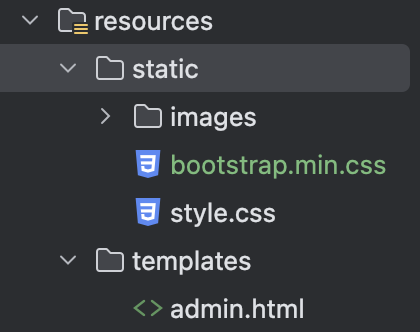
board_list.html
기존에 board_list.html 파일을 수정해준다
<!doctype html>
<html lang="ko" xmlns:th="http://www.thymeleaf.org">
<head>
    <meta charset="UTF-8">
    <meta name="viewport"
          content="width=device-width, user-scalable=no, initial-scale=1.0, maximum-scale=1.0, minimum-scale=1.0">
    <meta http-equiv="X-UA-Compatible" content="ie=edge">
    <link rel="stylesheet" type="text/css" th:href="@{/bootstrap.min.css}">

    <title>수리수리마수리</title>
</head>
<body>
    <div class="container my-3">
        <table class="table">
            <thead class="table-dark">
                <tr>
                    <th>번호</th>
                    <th>제목</th>
                    <th>작성일시</th>
                </tr>
            </thead>
            <tbody>
                <tr th:each="board, loop : ${boardList}">
                    <td th:text="${loop.count}"></td>
                    <td>
                        <a th:href="@{|/board/detail/${board.id}|}" th:text="${board.subject}"></a>
                    </td>
                    <td th:text="${#temporals.format(board.createDate, 'yyyy-MM-dd HH:mm')}"></td>
                </tr>
            </tbody>
        </table>
    </div>
</body>
</html>
board_detail.html
기존 board_detail.html 파일을 수정해준다.
<!doctype html>
<html lang="ko" xmlns:th="http://www.thymeleaf.org">
<head>
    <meta charset="UTF-8">
    <meta name="viewport"
          content="width=device-width, user-scalable=no, initial-scale=1.0, maximum-scale=1.0, minimum-scale=1.0">
    <meta http-equiv="X-UA-Compatible" content="ie=edge">
    <link rel="stylesheet" type="text/css" th:href="@{/bootstrap.min.css}">

    <title>수리수리마수리</title>
</head>
<body>

    <div class="container my-3">
        <!--게시물-->
        <!--제목-->
        <h2 class="border-bottom py-2" th:text="${board.subject}"></h2>
        <div class="card my-3">
            <div class="card-body">
                <div class="card-text" style="white-space: pre-line;" th:text="${board.content}"></div>
                <div class="d-flex justify-content-end">
                    <div class="badge bg-light text-dark p-2 text-start">
                        <div th:text="${#temporals.format(board.createDate, 'yyyy-MM-dd HH:mm')}"></div>
                    </div>
                </div>
            </div>
        </div>
        <!--댓글 갯수-->
        <h5 class="border-bottom my-3 py-2"
        th:text="|${#lists.size(board.commentList)}개의 답변이 있습니다.|"></h5>
        <!-- 댓글 반복 시작 -->
        <div class="card my-3" th:each="comment : ${board.commentList}">
            <div class="card-body">
                <div class="card-text" style="white-space: pre-line;" th:text="${comment.content}"></div>
                <div class="d-flex justify-content-end">
                    <div class="badge bg-light text-dark p-2 text-start">
                        <div th:text="${#temporals.format(comment.createDate, 'yyyy-MM-dd HH:mm')}"></div>
                    </div>
                </div>
            </div>
        </div>
        <!-- 댓글 반복 끝  -->
        <!-- 댓글 작성 -->
        <form th:action="@{|/comment/${board.id}|}" method="post" class="my-3">
            <textarea name="content" id="content" rows="10" class="form-control"></textarea>
            <input type="submit" value="댓글등록" class="btn btn-primary my-2">
        </form>
    </div>
</body>
</html>

'프로젝트 > 하고 싶은거 다해보는 내 사이트' 카테고리의 다른 글
'프로젝트/하고 싶은거 다해보는 내 사이트' Related Articles
more


